

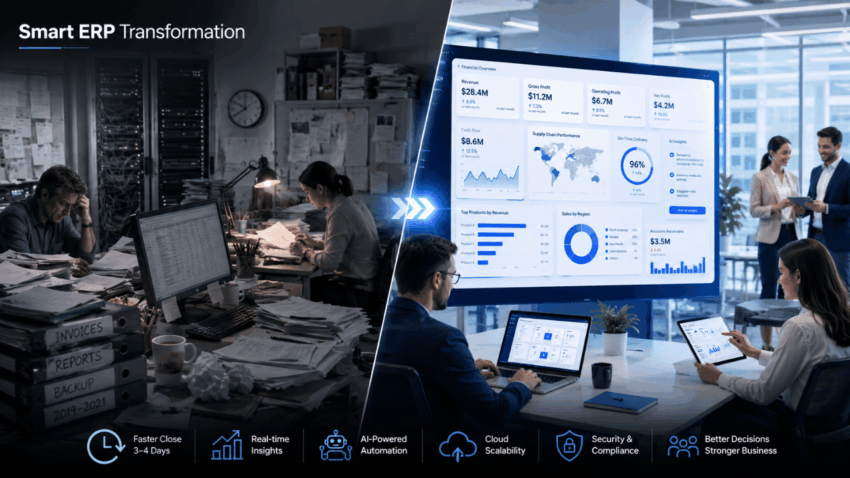
Legacy ERP systems are quietly draining enterprise budgets.
Slow financial closes, siloed data, manual processes that should have been automated years ago. These aren’t edge case problems. They’re the day-to-day reality for organizations still running fragmented systems across finance, supply chain, and operations. The cost shows up in delayed decisions, compliance exposure, and teams spending more time reconciling data than acting on it.
Microsoft Dynamics 365 ERP Solutions address this directly. One connected platform across the core business functions, built on cloud infrastructure, with AI embedded natively. This guide covers what the platform includes, how the services around it work, and what a successful deployment actually requires.
What Microsoft Dynamics 365 ERP Services Actually Cover
The term “ERP services” gets used broadly. Worth being specific about what it means in the Dynamics 365 context.
Dynamics 365 ERP services refer to solutions that help businesses implement, customize, and optimize Microsoft Dynamics 365 ERP applications. These services cover finance, supply chain, commerce, and operations management, enabling companies to modernize workflows, improve productivity, enhance decision-making, and adapt quickly to changing market needs.
In practice, that spans the full engagement lifecycle: initial discovery and scoping, system configuration, data migration from legacy platforms, integration with existing third-party tools, user training, and post-go-live support. Each phase carries its own complexity, and the quality of execution at each stage shapes the long-term performance of the system.
Microsoft Dynamics 365 is a cloud business suite that brings together financial management, CRM, customer service, business intelligence, field service, operations, marketing, project service automation, commerce, sales, and talent into a single end-to-end system. The breadth of that coverage is both the platform’s strength and the reason implementation requires genuine expertise to get right.
The Two Main Deployment Options
Dynamics 365 comes in two primary configurations, and choosing the right one matters before any implementation work begins.
Business Central handles the full ERP scope for small and mid-sized companies. It features core financials including General Ledger, Accounts Payable and Receivable, Electronic Banking, and Fixed Asset Management, and integrates seamlessly with Power BI, Power Automate, Office 365, Teams, CRM, and other modules. The familiar Microsoft interface reduces the learning curve for teams already working in the Office ecosystem.
Finance and Operations serves larger enterprises managing complex, multi-entity, or global operations. Companies typically move to Finance and Operations when they have expanded on a global scale, are managing multiple lines of business, and need a level of complexity and customization that exceeds what Business Central can handle.
The decision between the two comes down to operational complexity, transaction volume, and the degree of customization required across business units. Selecting the wrong configuration upfront creates expensive rework later. A proper discovery phase with an experienced partner surfaces this decision before it becomes a problem.
Core Modules and Where the Business Value Sits
Understanding the module structure helps enterprise leaders identify where Dynamics 365 will deliver the most immediate impact for their specific operations.
Finance handles the general ledger, accounts payable, accounts receivable, budgeting, and compliance reporting. The AI-driven forecasting layer gives finance teams real-time visibility into cash flow and period-end performance without manual data pulls. Financial close cycles that currently take 10 to 12 days routinely compress to three or four after a well-executed implementation.
Supply Chain Management connects procurement, inventory, warehouse management, and demand planning into one workflow. It enables enterprises to forecast demand with greater accuracy using AI-generated insights and external signals, and to eliminate stockouts by running material requirements planning in minutes rather than days. For manufacturers and distributors, that responsiveness changes how well they can manage supplier relationships and customer commitments simultaneously.
Human Resources centralizes employee records, payroll, and workforce planning inside the same platform handling finance and operations. Decisions about headcount, compensation, and organizational structure get made with complete data rather than exports from three different systems.
Project Operations covers planning, resource allocation, and billing for service-oriented organizations. Utilization rates, project margins, and budget versus actuals are visible in real time, which changes how quickly project leaders can intervene when something runs off course.
The modular structure allows organizations to deploy only the applications they need today, while adding others as the business grows. That flexibility is operationally valuable for companies at different stages of digital maturity.
AI and Automation Inside the Platform
Dynamics 365 has moved well past basic ERP functionality. The AI layer built into the platform changes what the system can do beyond recording and reporting.
Microsoft Dynamics 365 ERP allows informed decisions at every level with real-time analytics and AI-powered insights. Centralized reporting and predictive forecasting ensure greater visibility, so organizations can act proactively and maintain performance across departments.
Microsoft Copilot, embedded natively across modules, lets users query data, generate summaries, and surface recommendations through natural language. A finance manager can ask for a cash flow projection, a supply chain lead can check supplier risk exposure, and a sales director can pull pipeline analysis, all without building custom reports or waiting on IT.
The automation layer handles the repeatable, rules-based work that consumes disproportionate time across operations teams. Invoice processing, purchase order approvals, compliance checks, and period-end reporting tasks run autonomously within defined parameters. The humans in those functions shift their time toward analysis and decisions rather than execution.
Integration With the Microsoft Ecosystem
One of the clearest practical advantages of Dynamics 365 over competing ERP platforms is how cleanly it connects to the tools most enterprise teams already use.
Dynamics 365 integrates with Microsoft 365, Power Automate, and the Power Platform to enable organizations to automate workflows and analyze data in real time. A finance team running Excel-based reporting doesn’t need to change its workflow. The data flows from Dynamics into the tools they already work in.
For businesses with unique workflows and legacy systems, Dynamics 365 offers powerful API capabilities. Developers can build secure, custom connections between Dynamics and existing software stacks to facilitate smooth data flow and centralized operations without compromising control or flexibility.
This matters because most enterprise ERP implementations aren’t greenfield deployments. They sit next to payroll platforms, e-commerce systems, logistics tools, and industry-specific applications that can’t be replaced. An ERP that integrates cleanly with those systems through well-documented APIs reduces the integration risk that derails a significant number of implementations.
Cloud Deployment and What It Changes Operationally
The shift from on-premises to cloud ERP changes the total cost structure significantly.
Cloud ERP solutions are hosted on the vendor’s servers and accessed via the internet, with automatic updates and lower IT overhead. They operate on a subscription model, removing the high upfront capital investment associated with on-premises deployments.
For distributed enterprises, the operational implications go further than cost. Teams in different countries, offices, and time zones work from the same live data. A supply chain manager in one region and a finance lead in another pull from the same system in real time, without VPN constraints or stale data exports.
GSE Environmental migrated to Dynamics 365 and centralized its data, reducing on-premises IT infrastructure and cutting departmental spending by more than 70%. That’s an extreme example, but the direction of travel is consistent: cloud ERP reduces infrastructure overhead while improving data accessibility and system resilience.
Automatic updates mean the platform stays current without scheduled downtime for patching cycles. Security certifications and compliance frameworks are maintained by Microsoft at the infrastructure level, removing that burden from internal IT teams.
What a Structured Implementation Looks Like
ERP implementations fail at a high rate, and the failure patterns are well-documented. Studies show that over half of ERP projects fail to meet their goals. The causes are consistent: poor planning, wrong partner selection, inadequate data preparation, and insufficient user training.
A structured Dynamics 365 implementation follows a clear sequence.
Discovery and scoping comes first. This phase maps current business processes, identifies gaps between existing workflows and the platform’s standard functionality, and defines the configuration requirements before any technical work begins. Skipping or rushing this phase is where most implementations start to go wrong.
Data migration deserves more rigor than most organizations apply to it. Migrating poor data leads to duplicates, broken reports, and missing history. Data should be audited and cleaned at least six months before going live, with standardization and deduplication completed before migration begins. The ERP system is only as reliable as the data inside it.
Configuration and integration follows discovery. Modules get configured to match the business workflows defined in the discovery phase. Integrations with third-party systems are built and tested. Customizations are applied selectively, only where standard functionality genuinely can’t meet the requirement.
Testing covers all features, reports, and automations before any go-live decision is made. A phased rollout starting with a pilot reduces risk and gives the implementation team real user feedback before full deployment.
Training and adoption often gets underweighted in the project budget. Role-based training that mirrors daily tasks, such as creating quotes or processing orders, outperforms generic feature walkthroughs every time. Users who understand how the system improves their specific job adopt it. Users who receive a general platform overview often revert to old habits.
Choosing the Right Implementation Partner
The platform is proven. The implementation is where outcomes diverge.
Look for a partner holding Microsoft Solutions Partner: Business Applications status. Consultants should hold relevant certifications such as MB-300 for Dynamics 365 Finance and Operations or MB-210 for Dynamics 365 Sales. Certifications are the baseline. What matters more is demonstrated delivery experience in your industry and at your scale.
Ask partners how they handle the discovery phase specifically. Ask about their data migration methodology. Ask what their post-go-live support model looks like in the first 90 days. The answers reveal how many times they’ve actually navigated each stage versus how well they’ve described it in a proposal.
Devsinc delivers end-to-end Dynamics 365 ERP services for enterprise clients, from initial scoping through configuration, integration, training, and long-term support. If your organization is planning a Dynamics 365 implementation or migrating from a legacy ERP, their team is worth talking to before the project scope is locked.
The ROI Timeline Is Shorter Than Most Expect
Enterprise leaders sometimes approach ERP investments with long payback assumptions. The data on Dynamics 365 suggests otherwise.
Organizations typically see measurable gains within six to nine months of go-live, including faster financial closes, fewer manual tasks, and improved accuracy. Full ROI usually arrives within 18 to 24 months.
The compounding effect matters over time. Each quarter the system runs on clean, integrated data, the forecasting gets more accurate. Each year the automation layer handles more routine work, the operational overhead decreases. The organizations that implement well and stay on the platform build a data advantage that’s genuinely hard for competitors to close.
The question for enterprise leaders isn’t whether the platform delivers value. The Forrester, Gartner, and IDC assessments answer that. Microsoft was named a Leader in three separate Gartner Magic Quadrant reports for Cloud ERP in 2025, covering service-centric enterprises, product-centric enterprises, and finance.
The question is whether the implementation is scoped, executed, and supported well enough to capture it. That answer depends almost entirely on the decisions made before the first line of configuration code is written.
