

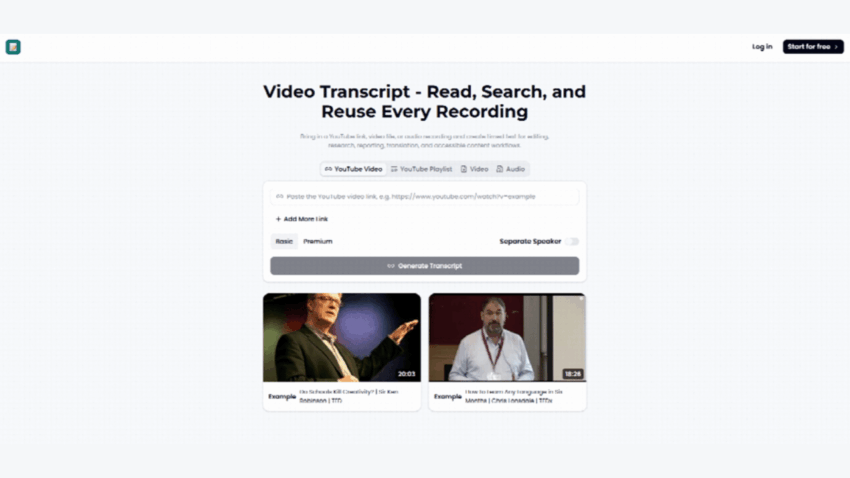
Ever sat through a 45-minute podcast just to find one quote? Yeah, me too. That’s the exact moment I started hunting for a decent video transcript tool.
Turns out, the market’s crowded. But two names kept popping up in every forum thread: VideoTranscript.ai and TranscriptVideo.ai. So I actually used both. Not skimmed the homepage — used them.
Here’s everything I found.
Why Video Transcript Tools Suddenly Matter So Much
Video content exploded. Captions and transcripts didn’t just become “nice to have.”
According to widely cited social platform data, a large majority of video views on Facebook happen with the sound off. No captions, no context, no watch time.
That single fact turned Video Transcript generation from a niche editing task into a core content strategy move. Podcasters need it for SEO. Marketers need it for accessibility compliance. YouTubers need it for repurposing one video into ten blog posts.
So the real question isn’t “should I transcribe my video?” It’s “which tool actually does it well?”
Meet the Contenders
Both tools promise the same core outcome: turn spoken video into readable, usable text. Fast.
But they get there in noticeably different ways, and that difference matters once you’re staring at your actual output.
VideoTranscript.ai: The Straight-Shooter
What It’s Built For
VideoTranscript positions itself as a no-nonsense video transcript generator. Upload, wait, download. That’s the pitch.
It leans heavily on speed and simplicity rather than a loaded feature list.
Standout Capabilities
During testing, three things stood out immediately.
- Fast turnaround — a 20-minute interview clip came back transcribed in just a few minutes.
- Clean timestamp syncing — each line lined up with the audio, which mattered a lot when I needed to pull exact quotes.
- Simple export options — plain text and SRT formats, ready to drop straight into a video editor.
My Actual Testing Experience
I ran a rough home-recorded interview through it — background noise, overlapping voices, the works.
It handled the primary speaker’s audio surprisingly well. Where it stumbled was cross-talk; a few overlapping sentences got merged into one confusing line.
Not a dealbreaker, but worth knowing if your source video isn’t studio-clean.
Pros and Cons
Pros:
- Fast processing, even on longer files
- Clean, readable output formatting
- Minimal learning curve — genuinely upload-and-go
Cons:
- Struggles slightly with heavy background noise
- Fewer advanced editing tools inside the platform
TranscriptVideo.ai: The Feature-Packed Alternative
What It’s Built For
TranscriptVideo.ai feels like it was designed for people who want to do more with their transcript, not just get one.
It’s less “quick tool” and more “workspace.”
Standout Capabilities
Here’s what jumped out during my hands-on run:
- In-platform editing — you can tweak the transcript directly without exporting first.
- Speaker separation — it attempts to label different speakers, useful for multi-person interviews or podcasts.
- Multiple export formats — beyond plain text, it supports formats built for subtitle workflows and content repurposing.
My Actual Testing Experience
I fed it the same messy home interview clip.
Speaker separation worked better than expected — it correctly split most of the back-and-forth dialogue. The in-platform editor also made quick corrections painless; I wasn’t bouncing between apps.
The trade-off? Processing took noticeably longer than VideoTranscript.ai on the same file length.
Pros and Cons
Pros:
- Solid speaker distinction on multi-voice audio
- Built-in editing saves a step
- More flexible for repurposing content later
Cons:
- Slower processing time on longer videos
- Slightly steeper learning curve for first-time users
Head-to-Head: What’s Actually Different
Both tools nail the basic promise — turning video into text you can actually use.
Where they split is workflow philosophy.
| Factor | VideoTranscript.ai | TranscriptVideo.ai |
| Speed | Faster | Slower |
| Speaker labeling | Basic | Stronger |
| Editing tools | Minimal | Built-in |
| Best for | Quick single-speaker clips | Multi-speaker, repurposing-heavy workflows |
If speed is your priority, one wins. If you’re building a full content pipeline from one video, the other pulls ahead.
Neither is “bad.” They’re just built for different jobs.
Who Should Use Which
Solo creators pumping out quick clips will likely prefer the faster, simpler option.
Podcasters and teams juggling multi-speaker recordings will probably lean toward the tool with stronger speaker separation and built-in editing.
There’s no universal winner here — just a better fit depending on your actual footage.
Where This Fits Into the Bigger Content Game
Content repurposing has become a core SEO strategy, not a bonus tactic.
Turning one video into a blog post, a transcript page, and a set of captions multiplies your reach from a single recording session. Search engines index text, not audio — so a solid video transcript directly feeds discoverability.
Accessibility guidelines are pushing in the same direction. Many web accessibility standards now explicitly recommend text alternatives for video and audio content.
In short, transcript tools aren’t just convenience anymore. They’re infrastructure.
Final Thought
Both VideoTranscript.ai and TranscriptVideo.ai deliver on the basic promise of converting video into text. Neither is flashy for the sake of it.
Pick based on your actual footage type and workflow, not the marketing copy. Test both on your messiest, most realistic clip — that’s where the real differences show up.
That’s exactly what I did. And now you know what to expect before you upload a single file.
