

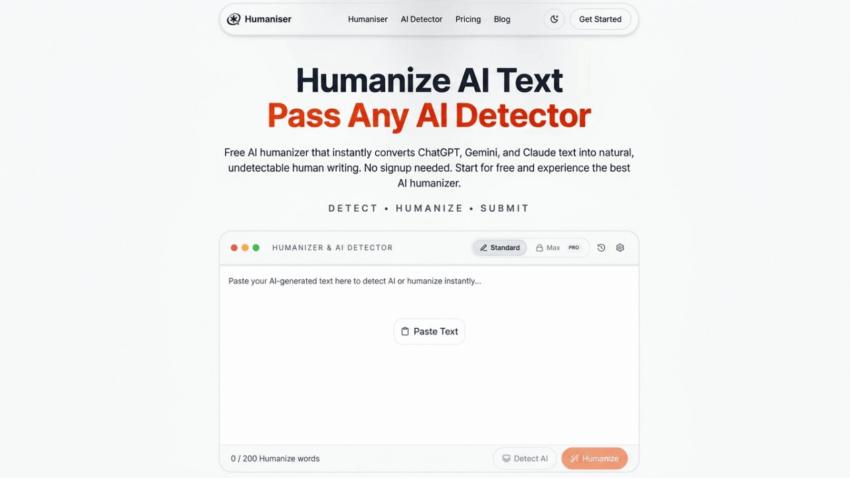
If you’ve spent any time trying to fix AI generated writing by hand, you know how tedious it gets. Rewrite one sentence, and three paragraphs later the same stiff pattern shows up again. Online tools built to humanize AI text exist specifically to take that tedium off your plate, running an automated pass over a whole draft in seconds instead of a slow sentence by sentence rewrite. Here’s a practical look at how these tools actually work, what separates a genuinely useful one from a gimmick, and how to get real value out of a humaniser AI free tier without expecting more than it can deliver.
What “Humanizing” Actually Means in Practice
The term sounds vague, so it helps to break it into what actually happens under the hood. A humaniser takes AI generated text and adjusts three main things: how long and varied your sentences are, how generic or specific your word choices are, and how repetitive your transitions and phrasing patterns look across the whole piece. AI writing tends to be smooth and even in all three of these areas, since language models are built to predict likely words and produce consistent structure. Human writing is naturally messier, mixing short sentences with long ones, reaching for unusual phrasing sometimes, and rarely repeating the exact same transition twice in a row. A good humaniser nudges AI text closer to that natural messiness without changing what the text actually says.
Free vs Paid: What You’re Actually Trading Off
Free humaniser tools generally use the same underlying approach as paid ones. The real differences tend to show up in three places. Daily or monthly usage limits are the most common restriction, capping how many words or how many separate runs you get before hitting a wall. Length limits per submission matter too, since a free tier might handle a blog post fine but choke on a full chapter or a long report. And extra features, multiple tone presets, batch processing, more granular control over how aggressive the rewrite is, tend to sit behind a paywall. For occasional use, humanizing a single email or a short piece of content here and there, a free tier usually covers the actual need completely. The limits start to matter once you’re processing volume regularly.
The Workflow That Actually Gets Good Results
Start with a genuine draft, whether that’s something you wrote yourself and want to sound more natural, or an AI generated first pass you’re using as raw material. Paste it into the tool and, if it offers the option, specify the tone you’re going for, casual, professional, conversational, since the right output depends heavily on matching that setting to your actual context. Run the humanization pass and then, this part matters more than people expect, read the result closely rather than copying and pasting it straight into whatever you’re sending or publishing. Check that no fact got altered, that the meaning of every sentence still matches what you intended, and that the tone actually fits the piece. If something still feels a bit stiff, most tools let you run it again or adjust settings and try a different pass.
Signs a Humaniser Tool Is Actually Doing Its Job Well
The clearest indicator is variation. Read the output and check whether sentence lengths actually differ from one to the next, rather than settling into the same medium length pattern the original had. Look at word choice too. Generic terms like “robust,” “leverage,” or “comprehensive” should mostly be gone, replaced with something that sounds specific to your actual topic rather than interchangeable with any other piece of writing. And check that repeated transitional phrases have been thinned out or removed, since a tool that just swaps a few words around but leaves the same “furthermore, it is important to note” structure intact throughout isn’t really doing the job a humaniser is supposed to do.
Where These Tools Fall Short, Even the Good Ones
No humaniser can add expertise that isn’t already in the draft. If a piece is fluent but genuinely says nothing insightful, a humanization pass produces fluent writing that still says nothing insightful, just with better sentence variety. These tools also can’t fact check anything. AI generated text sometimes contains confidently wrong information, and a humaniser has no mechanism to catch that, since its entire job is about phrasing and rhythm rather than accuracy. And a humaniser can’t invent a genuine opinion where the original draft never had one. A real point of view is one of the clearest signals of human writing, and no automated rewrite convincingly manufactures that from a neutral, balanced first draft.
Will Humanized Text Reliably Beat an AI Content Detector?
Often, but not always, and it’s worth being honest about that uncertainty rather than promising something the technology can’t guarantee. Humanizing tools work by disrupting the exact statistical patterns detectors are trained to notice, low sentence variation, predictable word choices, so a good pass genuinely does lower detection scores in a lot of cases. But detection tools keep adapting too, and there’s no permanent guarantee that a humanized draft will pass every detector every time, particularly as detection technology continues to improve. Treat a lower detection score as a likely outcome of good humanization, not as the entire point of doing it. The actual point is writing that reads better, and passing detection tends to follow from that rather than the other way around.
A Reasonable Way to Think About Using These Tools
There’s a meaningful difference between using a free tool to humanize your own writing, smoothing out phrasing in something you actually wrote yourself, and using one to disguise a fully AI written piece you’re presenting as entirely your own. The first is a legitimate editing aid, genuinely useful for non native English speakers wanting their natural voice to come through more clearly, or for anyone who wants their writing to sound less mechanically even. The second carries the same underlying problem as submitting undisclosed AI work, regardless of how well the humanizing pass disguises it. If you’re using these tools to make your own genuine writing sound more natural, you’re using them exactly as intended.
Getting the Most Out of a Free Tier
Batch your work rather than running small pieces through repeatedly if your tool caps daily usage, since one longer, well organized submission tends to make better use of a limited quota than several scattered short ones. Save the output somewhere before you close the tab, since a lot of free tools don’t retain your history once you leave the page. And don’t rely on a single tool exclusively if the results feel inconsistent. Trying a different free humaniser occasionally can reveal whether your usual tool is genuinely doing a thorough rewrite or just making surface level changes that don’t hold up under a closer read.
What Good Humanizing Actually Buys You
The value here isn’t really about beating a detector or disguising anything. It’s about closing the gap between text that reads as technically correct and text that reads like an actual person wrote it, with real rhythm, specific word choices, and a voice that doesn’t sound interchangeable with a thousand other AI drafts. An online tools to humanize ai text won’t turn weak writing into strong writing, and it won’t replace your own judgment about whether a piece is actually good. What it will do, reliably and quickly, is take the stiffness out of a solid first draft, which for most everyday writing is exactly the help that’s actually needed.
