

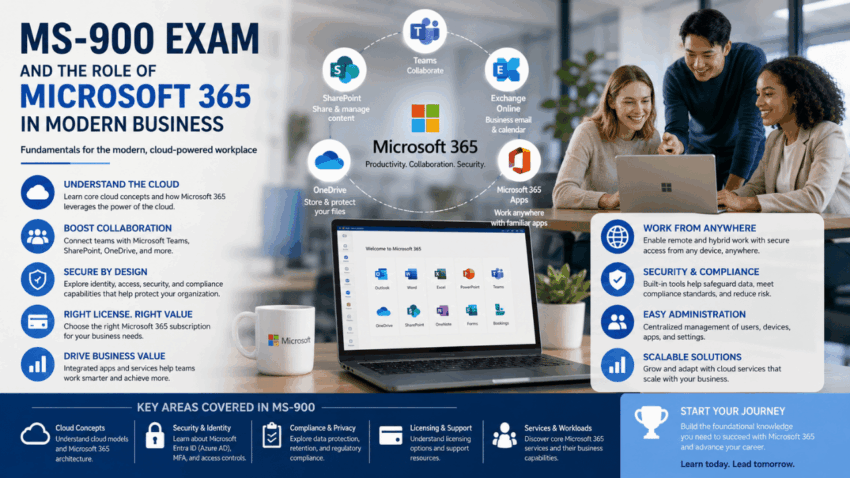
Cloud computing has changed the way organizations communicate, collaborate, store information, and manage everyday business activities. Instead of relying entirely on locally installed software and physical infrastructure, many businesses now use cloud-based platforms to provide employees with access to applications and information from different locations and devices.
Microsoft 365 is one of the major productivity ecosystems used by organizations around the world. It combines familiar productivity applications with cloud services designed to support communication, collaboration, security, and business operations.
The MS-900 exam is associated with the Microsoft 365 Certified: Fundamentals certification and introduces learners to important concepts surrounding Microsoft 365 services, cloud computing, security, compliance, and licensing. Understanding these subjects provides useful context for anyone interested in modern business technology.
Understanding Microsoft 365
Microsoft 365 brings together productivity applications and cloud-based services designed for individuals and organizations.
Depending on the subscription and organizational requirements, Microsoft 365 can provide access to services such as Microsoft Teams, SharePoint, Exchange Online, OneDrive, Microsoft 365 Apps, and various security and compliance capabilities.
These technologies can help organizations create connected workplaces where employees can communicate and access information without being dependent on a single physical location.
The Shift Toward Cloud Computing
Traditional IT environments often required organizations to purchase servers, install software, maintain hardware, and manage infrastructure internally.
Cloud computing introduced a different approach.
Instead of owning all the underlying infrastructure, organizations can use services provided through cloud platforms.
This can provide flexibility and allow businesses to scale technology according to their needs.
Cloud services can also reduce some infrastructure responsibilities because service providers manage significant portions of the underlying environment.
Software as a Service
Microsoft 365 is strongly associated with the Software as a Service, or SaaS, model.
With SaaS, users access software through an internet-connected environment while the service provider manages much of the underlying infrastructure.
This model can simplify software deployment and maintenance.
Organizations can also benefit from centralized administration and cloud-based updates.
However, businesses still need to manage users, permissions, policies, security, and organizational configurations.
Microsoft Teams
Microsoft Teams has become an important collaboration platform for modern organizations.
Teams supports communication through chat, meetings, calls, and collaboration spaces.
Employees can use Teams to communicate with colleagues, participate in meetings, share information, and collaborate on projects.
For businesses with distributed or hybrid workforces, collaboration platforms can help maintain communication between employees who may not work in the same physical office.
Exchange Online
Email remains an essential business communication method.
Exchange Online provides cloud-based email capabilities within the Microsoft 365 ecosystem.
Organizations can use it to manage business email, calendars, contacts, and related communication functions.
Cloud-based email can provide employees with access across multiple devices while allowing administrators to manage organizational policies centrally.
OneDrive and SharePoint
Microsoft 365 also provides cloud-based tools for storing and collaborating on documents.
OneDrive is commonly associated with individual user file storage, while SharePoint provides broader organizational collaboration and content management capabilities.
These services can help employees access documents from different locations and collaborate on files without relying exclusively on local storage.
Microsoft 365 Apps
Microsoft 365 includes familiar productivity applications such as Word, Excel, PowerPoint, and Outlook through its various subscription offerings.
Cloud-connected productivity applications can make it easier for users to work across multiple devices.
Organizations can also manage deployments and configurations according to their requirements.
The integration between productivity applications and cloud services is one of the important characteristics of the Microsoft 365 ecosystem.
Security in Microsoft 365
As organizations move more information into cloud platforms, security becomes increasingly important.
Microsoft 365 provides various security capabilities designed to help organizations protect accounts, applications, devices, and information.
Security can involve identity protection, authentication, access management, threat protection, and monitoring.
Organizations need to establish appropriate security policies and ensure that users understand their responsibilities.
Technology can provide important controls, but security also depends on organizational processes and user behavior.
Identity and Access Management
Identity management is a fundamental part of cloud computing.
Organizations need to know who is accessing their resources and what those users are permitted to do.
Microsoft identity services can help organizations manage users, groups, authentication, and access permissions.
Strong identity management can reduce unauthorized access and provide greater control over cloud resources.
Multi-factor authentication is another important security concept because it adds additional verification beyond a traditional password.
Compliance
Businesses often need to comply with legal, regulatory, and industry requirements.
Compliance can involve how information is stored, accessed, retained, and protected.
Microsoft 365 provides capabilities that can help organizations manage compliance-related requirements.
However, technology alone does not guarantee compliance. Organizations must understand their specific legal and regulatory responsibilities and configure systems appropriately.
Privacy and Data Protection
Data protection is increasingly important as businesses collect and process large amounts of information.
Organizations may handle customer records, employee information, financial data, intellectual property, and other sensitive material.
Microsoft 365 includes technologies and policies that can support data protection.
Businesses should consider who can access information, how data is shared, and how long it should be retained.
Microsoft 365 Licensing
Licensing is another important aspect of Microsoft 365.
Microsoft offers different subscription plans designed for different users and organizations.
The available applications, features, storage, security capabilities, and administrative functions can vary between plans.
Organizations therefore need to evaluate their requirements before selecting a subscription.
Factors may include the number of users, applications required, security needs, compliance requirements, and budget.
Business Value of Microsoft 365
The value of Microsoft 365 extends beyond individual applications.
When different services work together, organizations can create connected workflows.
For example, an employee may receive an email through Exchange Online, discuss the issue in Teams, collaborate on a document through SharePoint, and store personal working files in OneDrive.
This integration can reduce friction between different parts of the business workflow.
Supporting Remote and Hybrid Work
Remote and hybrid working models have increased the importance of cloud-based collaboration.
Employees may work from offices, homes, customer locations, or other environments.
Microsoft 365 can provide access to communication and productivity tools across multiple locations.
This flexibility can help organizations maintain business operations when employees are geographically distributed.
Administration and Management
Microsoft 365 environments require ongoing administration.
Administrators may manage users, licenses, applications, security policies, devices, and organizational settings.
Effective administration helps ensure that employees have appropriate access to the services they need while reducing unnecessary permissions.
Administrative responsibilities can vary considerably depending on organizational size and Microsoft 365 configuration.
Professionals researching Microsoft 365, cloud computing, productivity technologies, and related fundamentals can this link here.. for additional educational information while also consulting Microsoft’s official resources.
Career Relevance
Knowledge associated with MS-900 can provide useful background for several technology careers.
Potential areas include:
- IT Support
- Microsoft 365 Administration
- Cloud Administration
- Help Desk Services
- Systems Administration
- IT Management
- Cloud Consulting
The fundamentals can also help non-technical business professionals understand the technology their organizations use.
Frequently Asked Questions
What is the MS-900 exam?
MS-900 is associated with Microsoft 365 Fundamentals and covers foundational concepts related to Microsoft 365 services, cloud computing, security, compliance, and licensing.
What is Microsoft 365 used for?
Microsoft 365 can support communication, collaboration, productivity, document management, security, and other business activities.
Is Microsoft Teams part of Microsoft 365?
Yes. Teams is an important collaboration service within the Microsoft 365 ecosystem.
Why is cloud computing important?
Cloud computing allows organizations to access technology services through internet-based infrastructure rather than managing all resources locally.
Does Microsoft 365 include security features?
Yes. Microsoft 365 provides various security and identity capabilities, although organizations still need to configure and manage them according to their requirements.
Conclusion
The MS-900 exam provides an introduction to important concepts surrounding Microsoft 365 and modern cloud computing. Its associated subjects cover productivity applications, collaboration services, cloud concepts, security, compliance, licensing, and organizational technology.
Microsoft 365 has become an important part of the modern workplace because it connects communication, productivity, document management, collaboration, and security within a cloud-based ecosystem.
Understanding these technologies can help professionals recognize how modern organizations use cloud services to support employees and business operations.
As businesses continue adopting hybrid work environments and cloud-based applications, familiarity with Microsoft 365 fundamentals is likely to remain valuable. Whether someone works in IT support, administration, management, consulting, or another technology-related field, understanding the purpose and capabilities of Microsoft 365 can provide useful knowledge for navigating today’s increasingly connected digital workplace.
