

Losing important files can be stressful, especially when they contain personal photos, business documents, professional projects, or other valuable information. Data loss can happen for several reasons, including accidental deletion, formatted drives, corrupted storage devices, system crashes, or unexpected errors. Fortunately, reliable data recovery tools can help users recover lost or inaccessible files from compatible storage devices.
Choosing the right recovery tool depends on several factors, such as supported file formats, scanning capabilities, ease of use, compatibility, and pricing. In this article, we explore five data recovery software options for Windows users, starting with Stellar Data Recovery for Windows.
1. Stellar Data Recovery for Windows
Stellar Data Recovery for Windows is a dedicated recovery solution designed to help users retrieve lost, deleted, or inaccessible files from supported Windows storage devices. It is suitable for individuals, home users, and professionals who need a practical way to recover important data without relying entirely on technical expertise.
The software can help recover various types of files, including documents, photos, videos, audio files, and other commonly used formats. Depending on the selected edition and storage device, users can scan compatible hard drives, SSDs, USB flash drives, memory cards, and other supported media.
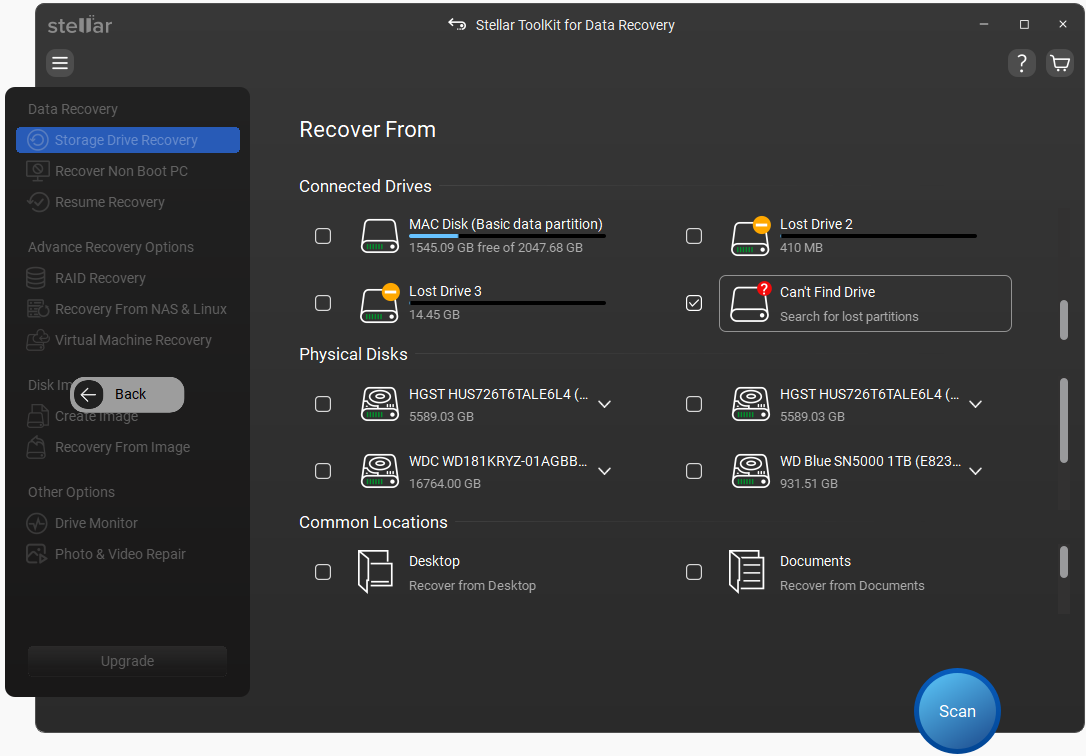
One of its key advantages is its user-friendly interface, which makes the recovery process more accessible to people with different levels of computer experience. Users can select a storage location, perform a scan, review the results, and choose the files they want to recover.
Stellar also provides scanning options intended to help users locate files that may not appear during a basic search. Deep scanning can be particularly useful when files are missing because of formatting or certain types of file-system damage.
Before beginning recovery, users can review the available files and select the items they need. This helps make the process more organized when dealing with large amounts of lost data.
For anyone comparing data recovery software for windows, Stellar Data Recovery Professional is a strong starting point because it combines accessible controls with recovery features for a range of common data-loss situations.
Best for: Home users and professionals seeking a dedicated Windows recovery tool with straightforward scanning and file-selection options.
Important consideration: Recovery results depend on the type of data loss, the condition of the storage device, and whether the lost data has been overwritten. Check the current product edition and its feature limitations before purchasing.
2. Recuva
Recuva is a Windows data recovery utility developed by CCleaner. It is commonly considered by users who want a straightforward option for recovering accidentally deleted files.
The software can help locate deleted documents, images, videos, and other file types on compatible storage devices. Its guided recovery process makes it relatively easy for beginners to select a location, scan for missing files, and review the results.
Recuva also offers a deep-scan option that can search for files that are harder to locate through a standard scan. However, its effectiveness varies depending on the file system, storage device, and circumstances surrounding the deletion.
The availability of a free version makes it worth considering for basic recovery needs. Users should remember that installing recovery software on the same drive where files were lost may overwrite recoverable data.
Best for: Users looking for a simple utility to recover recently deleted files.
3. R-Studio
R-Studio is a data recovery application designed for more advanced recovery scenarios. It is particularly relevant to IT professionals, technicians, and experienced users who need detailed control over scanning and recovery operations.
The software supports several file systems and provides tools for working with damaged partitions, inaccessible volumes, and certain complex data-loss situations. Its capabilities can be valuable when a straightforward recovery utility is not sufficient.
R-Studio also includes advanced options for analyzing storage devices and locating recoverable files. However, its interface and extensive feature set may feel complicated to beginners.
Users should review the available editions carefully because supported features and licensing can differ. For damaged or unstable drives, creating a disk image before attempting recovery may help reduce the risk of further deterioration.
Best for: Experienced users and technical professionals who need advanced recovery controls.
4. PhotoRec
PhotoRec is a free, open-source file recovery utility designed to recover files from various storage devices. Despite its name, it supports recovery of many file types beyond photographs, including documents, videos, and archives.
One of its main strengths is its ability to identify files using their underlying data signatures rather than relying exclusively on the file system. This can make it useful when a file system has been damaged or formatted.
PhotoRec is available for multiple operating systems, including Windows. However, its interface is less familiar than that of many commercial recovery products, and recovered files may not retain their original filenames or folder structure.
Because of these limitations, users may need to spend additional time identifying and organizing recovered files.
Best for: Budget-conscious users and technically confident individuals who prefer open-source recovery tools.
5. TestDisk
TestDisk is another free, open-source utility frequently used for storage troubleshooting and data recovery. It focuses primarily on recovering lost partitions and repairing certain disk-related problems that can prevent a drive from being accessed normally.
It can be helpful when a partition disappears, a disk’s partition table becomes damaged, or a storage device no longer displays its expected volumes. In some situations, restoring access to a partition can make existing files accessible again.
TestDisk is not primarily designed as a beginner-friendly deleted-file recovery application. Its text-based interface requires care, and users should understand the consequences of disk operations before making changes.
When a drive contains irreplaceable information, avoid writing changes to it until the recovery situation has been assessed properly.
Best for: Technically experienced users who need partition recovery and disk repair capabilities.
How to Choose the Right Data Recovery Software
Before selecting a recovery tool, consider the following factors:
- Ease of use: Beginners may prefer a clear interface with guided scanning and recovery steps.
- Supported devices: Confirm compatibility with your hard drive, SSD, USB drive, memory card, or other storage media.
- File types: Make sure the software supports the documents, photos, videos, or other files you need to recover.
- Scanning capabilities: Deep scanning and file-system support can matter when dealing with formatted drives or damaged storage.
- Pricing and licensing: Compare free features, paid editions, recovery limits, and upgrade requirements.
- Data safety: Avoid saving recovered files to the same drive from which they were lost.
If a storage device is making unusual noises, repeatedly disconnecting, or showing signs of physical damage, stop using it and consider professional data recovery assistance.
Final Thoughts
The best Windows data recovery software depends on your technical experience and the type of data loss you are trying to resolve. Recuva can be useful for basic deleted-file recovery, R-Studio offers advanced controls, PhotoRec provides an open-source alternative, and TestDisk focuses on partition-related problems.
For users seeking a dedicated recovery application with an accessible workflow, Stellar Data Recovery for Windows is a worthwhile option to evaluate first. Its scanning and file-recovery features can help address common data-loss situations, although no software can guarantee recovery in every case.
Before choosing any solution, review its current features, compatibility, and licensing requirements. Most importantly, stop writing new data to the affected storage device as soon as you discover that important files are missing. Acting quickly can improve the chances of successful recovery.
