

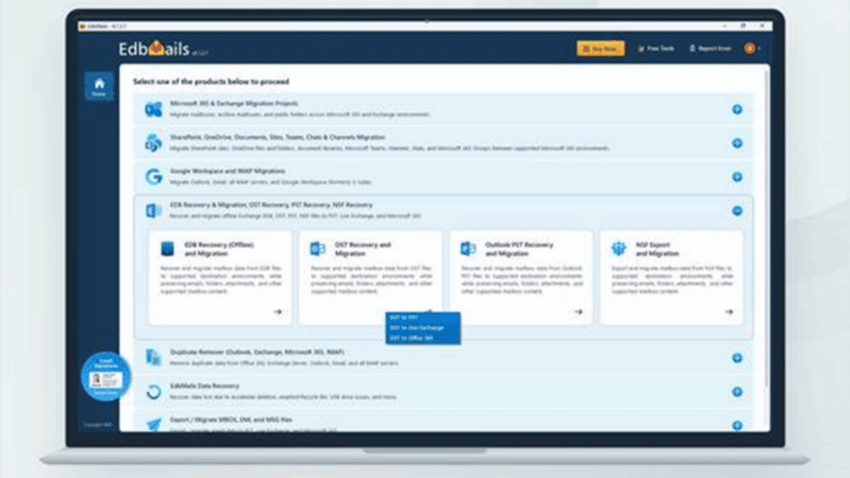
An old Outlook profile stops working, but the OST file is still on the computer. Can EdbMails make that data accessible again? Here is a closer look at the recovery workflow, real application screens and what to check before exporting.
The email account is gone, the laptop is still there, and an OST file may hold the messages everyone needs. Outlook cannot simply import that file into a new profile. That is the situation EdbMails OST to PST Converter sets out to solve.
With EdbMails OST to PST Converter, the starting point is the file itself. The Windows application scans the OST, shows the folders and items it can read, and lets you export chosen content to PST. It also provides separate migration options for organizations moving recovered mail into Microsoft 365 or Exchange.
The useful question is not just whether a PST can be created. It is whether the emails, attachments, contacts and calendar entries you are looking for are still in the OST, and whether the exported file opens as expected in Outlook.
Review at a glance
- Best suited to: Orphaned OST files and inaccessible Outlook mailbox data
- Core workflow: Scan → preview → select → export → verify
- Trial allowance: Export up to 30 items per folder
- Important prerequisite: Supported Outlook installation and configured profile for PST export
- Recovery scope: Orphaned OSTs, multiple files and selective mailbox recovery
- License benefits: Lifetime license, free upgrades and 24/7 technical assistance
Why an OST can be difficult to open
Outlook uses OST files to keep a synchronized copy of an Exchange or Microsoft 365 mailbox on a Windows computer. They are useful while the account is connected, including when someone needs to read already downloaded mail offline. But an OST is different from a PST archive: it is tied to the account and profile that created it.
If that account has been removed, or the Outlook profile no longer works, the OST may remain on disk even though Outlook cannot open it in the usual way. Rebuilding the profile does not necessarily help when the original mailbox has been deleted.
A familiar recovery problem
Imagine an IT administrator trying to recover project correspondence from a former employee’s PC. The mailbox is no longer available, but the machine still contains its OST. The administrator does not need a complicated restoration project if the goal is simply to retrieve several emails and their attachments.
The job becomes much easier to assess when the software can answer three straightforward questions: does it recognize the file, can it show the missing messages, and can it export those messages into a format Outlook can open?
A useful distinction
If the live Microsoft 365 or Exchange mailbox still contains all the required mail, repairing Outlook or using the normal export route is usually the simpler first choice. A converter is most useful when the OST holds information that cannot be reached that way.
When is an OST converter the right tool?
Not every Outlook error calls for recovery software. The condition of the original mailbox determines whether an OST converter is worth using.
A quick guide to the options
- The mailbox is still available: Try Outlook’s normal access, synchronization or export options first. The server may contain mail that never reached the OST.
- The Outlook profile is broken: If the account still works, creating a fresh profile is often easier than recovering the old cache.
- The account is gone, but the OST remains: This is where EdbMails is especially relevant: it can inspect readable data without reconnecting to the deleted account.
- The OST is damaged: Previewing the contents helps show what is still readable. The severity of the damage affects the result.
The distinction matters because an OST does not always contain every item that once existed on the server. EdbMails can work with the information still present in the file; it cannot recreate mail that was never cached locally.
A closer look at the EdbMails application
The interface is organized around a sequence of choices: select the OST to PST route, inspect the available mailbox folders and confirm the PST export. The three actual EdbMails screens below show those stages.
There are no command-line steps to learn. The main thing to get right is selecting the correct recovery path and checking the folders before you export.
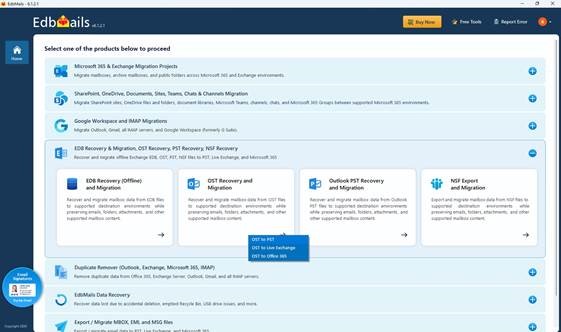
Start with OST Recovery and Migration
Before opening the file, close Outlook if it is using the OST and preserve a separate copy. From the EdbMails home screen, open OST Recovery and Migration and choose OST to PST.
The initial screen also shows the other recovery and migration paths available in EdbMails. For this task, the OST to PST option is the one to select.
Inspect the mailbox before exporting
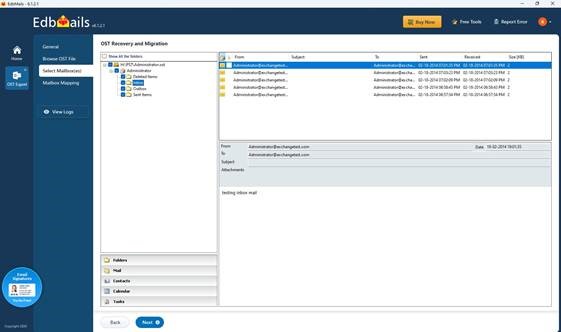
Once EdbMails has scanned the selected OST, it shows the folder tree beside a list of messages. You can browse Inbox, Sent Items and other available folders, then inspect the data before choosing what to export.
For a missing-mailbox case, this preview is especially useful. You can look for a particular sender, date or attachment instead of exporting everything and hoping the right content is there.
Check the mailbox mapping and start export
After deciding what to recover, select the required mailbox or folders. EdbMails also offers filtering options when only a particular set of messages is needed.
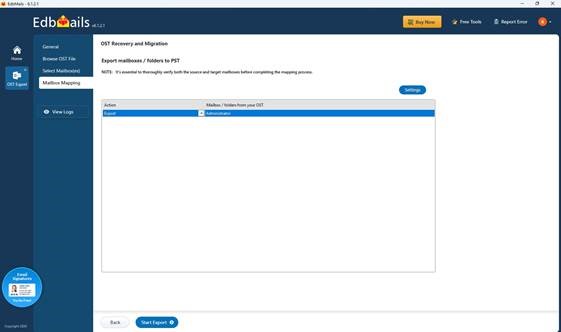
On the mapping screen, check that the action is set to Export and the intended mailbox or folders appear in the list. Then start the export.
The process does not end with the export message. The report helps you review what was processed, but the most useful check is to open the resulting PST in Outlook and inspect the items you actually needed.
Outlook requirement
OST scanning and preview can be performed without the original account connection. Exporting recovered content into a PST requires a supported Outlook installation with a configured profile. Direct Microsoft 365 or Exchange migration uses a different destination workflow.
Four features that make a practical difference
1. Opening orphaned OST files
One of the clearest reasons to consider EdbMails is its ability to scan an OST without connecting to the original Exchange or Microsoft 365 account. If a former user’s mailbox has been deleted, that can make the difference between having a file you cannot open and being able to examine its contents.
2. Choosing only the data you need
Recovering an entire mailbox is not always necessary. Sometimes the request is for a few months of correspondence, a particular project folder or some missing attachments. EdbMails lets users select folders and supported items rather than treating every job as a full export. Filtering options provide additional control.
3. Working with larger files and multiple OSTs
EdbMails does not impose an application-level size limit on the source OST, and its licensing supports recovery from multiple OST files without a per-file fee. That is useful if an administrator has several computers to examine. Performance will still depend on the source file’s condition, storage speed, item count and available memory.
PST splitting and additional formats, including EML, HTML and MHT, offer flexibility when the target is not one large archive. Direct migration to Microsoft 365 and Exchange is available through the applicable editions.
4. A trial that lets users inspect real output
The free trial can scan and preview the OST, then export up to 30 items per folder to PST. That is more useful than a preview-only trial because it gives someone a chance to open the resulting file in Outlook and check sample messages and attachments before buying.
A useful buying test
The free trial lets you see whether the OST contains the required data and whether sample messages open correctly in Outlook before you pay for a full export.
Licensing and value: what does EdbMails include?
Price is an important part of this review. EdbMails lists its OST to PST Personal Edition at $45, making it an accessible option for someone who needs to recover an old mailbox without committing to an expensive annual license.
| Edition | Listed price | Who it is for |
| Personal | $45 | OST to PST conversion and recovery for individual or permitted personal use. |
| Corporate Premium | $129 | Adds supported OST migration to Microsoft 365 and Exchange. |
| Technical | $189 | Designed for technical service providers and customer recovery work, subject to edition rights. |
Prices shown are from the published EdbMails listing checked in October 2026 and may change.
What adds value beyond the purchase price?
The license terms are a genuine selling point. EdbMails lists a lifetime license, free software upgrades and free 24/7 technical assistance. It also supports unlimited OST mailbox recovery and export under the relevant license, without a per-OST charge or application-imposed source file-size cap.
By comparison, some competing desktop converters use one-year licenses or limit the number of mailboxes in an entry-level edition. That does not mean every competitor costs more for every use case; it means the license terms deserve as much attention as the number on the price tag.
What stands out about the pricing
For a straightforward OST-to-PST job, the $45 Personal Edition combines the core recovery features with ongoing support and upgrades. Buyers who also need Microsoft 365 or Exchange migration should compare the higher editions rather than assuming those destinations are included at the entry price.
What to know before converting an OST file
An OST is a local cache, not a complete backup of everything that has ever been in a mailbox. If the computer never downloaded a particular message, no converter can extract it from that file. Similarly, heavily damaged data may not be readable in full.
Where EdbMails fits well
- Accessing an OST after the original account has been removed
- Previewing messages before committing to a full export
- Recovering selected folders and attachments
- Handling more than one OST file
- Checking export reports after conversion
Things to consider
- Only data still present and readable can be recovered
- PST export requires a supported Outlook setup
- Very large files require enough time and disk space
- Direct cloud migration depends on the licensed edition
- Windows is required for the desktop application
These are practical considerations rather than reasons to rule out the product. For an unusual or damaged OST, the best first move is to preview the actual file and use the trial to check a small PST export.
How to tell whether the exported PST is usable
A completed export message is encouraging, but the result should be checked in Outlook. For an important recovery, a few simple checks go a long way.
- Check the folder structure. Confirm that the expected Inbox, Sent Items and custom folders are present.
- Open representative messages. Look at the dates, senders, recipients and body formatting.
- Try the attachments. Make sure the documents that prompted the recovery can actually be opened.
- Inspect other mailbox items. Review any important contacts, calendars or tasks.
- Read the export report. Use the logs to spot items or folders that may need another look.
- Use a supported Outlook profile. Open the PST and navigate through it normally.
If you are evaluating the free trial, use its 30-items-per-folder allowance for a representative sample, particularly from the folders you care about most.
Who is EdbMails best suited for?
EdbMails makes the most sense when there is an actual OST recovery problem to solve. An Outlook user with a healthy live mailbox probably does not need a dedicated converter; an administrator facing an orphaned OST often does.
| Situation | Likely approach |
| Former employee’s mailbox is gone, but the OST remains | Use EdbMails to inspect the file and export readable messages. |
| Need a handful of emails or attachments | Use the folder preview and selective export. |
| Several old OST files need attention | Multiple-file support and no per-OST fee are valuable. |
| Original mailbox is healthy | Start with Outlook or Microsoft 365’s normal export options. |
| Recovered data must go into Microsoft 365 or Exchange | Check Corporate Premium or Technical Edition for the required migration route. |
The Personal Edition is the obvious starting point when PST is the only required output. Organizations and service providers should check the edition rights carefully before choosing a license.
Related software
Sigsync: Microsoft 365 Email Signature Software
While EdbMails OST to PST Converter focuses on recovering and converting Outlook OST files to PST format, Sigsync supports another part of Microsoft 365 email administration: creating and maintaining professional, consistent email signatures.
Sigsync lets IT teams manage signature templates centrally, populate employee contact details using Microsoft Entra ID (Azure AD) attributes, assign different signatures to departments, and add marketing banners for campaigns and announcements.
Sigsync offers flexible email signature management modes, including Centralized (Combo), Server-side, and Client-side. The recommended Centralized (Combo) mode combines Outlook Add-in functionality with server-side signature processing, helping maintain consistent email signatures across supported devices and email clients while giving organizations greater control over their signature workflows.
Explore Sigsync Microsoft 365 Email Signature Software
Frequently asked questions
Can EdbMails open an OST after the Exchange account is deleted?
It can scan and preview information that remains readable in a preserved OST without connecting to the original mailbox. The result depends on what is still stored in the file.
Does EdbMails need Microsoft Outlook?
The original Outlook account is not needed for OST scanning and preview. A supported Outlook installation and configured profile are required for PST export.
What can the free trial actually export?
Up to 30 items per folder can be exported to PST, allowing users to test representative output before purchasing.
Is there a limit on OST file size or number of files?
EdbMails supports OST files without an application-imposed size limit and allows multiple OST files to be processed. Actual processing time depends on file condition, hardware and available storage, while usage rights depend on the selected license.
What do the license and support include?
EdbMails lists lifetime licensing, free software upgrades and free 24/7 technical assistance. Check the current edition terms for permitted use and installation rights.
10 / Final assessment
Final verdict: a useful option when Outlook data is stranded
EdbMails OST to PST Converter earns consideration for a simple reason: it concentrates on the steps that matter when Outlook will not open an old mailbox file. You can inspect the OST, choose what to recover, export it to PST and check the result. The actual application screens make that process easy to follow.
The licensing also strengthens the overall package. A lifetime license, free upgrades and 24/7 technical assistance can be especially useful for people who want to keep a recovery tool available beyond a single job. The pricing details are worth reviewing alongside the recovery and export features.
Its limitations are worth understanding. An OST may not contain a full copy of the original mailbox, and recovery quality always depends on what remains readable. That is why the trial export matters: it gives you a chance to check the emails and attachments you need before making the purchase.
For a healthy mailbox, normal Outlook options may still be the easier route. For an orphaned or inaccessible OST, EdbMails is a sensible option to investigate.
