

There’s something quietly heartbreaking about finding an old photo album in a drawer — faces you love, moments that can never be repeated, all slowly fading into yellow and blur. For a long time, restoring those images meant hiring a professional or spending hours in Photoshop. That’s changed. Tools like Nano Banana AI have made it genuinely easy for anyone to bring old, damaged photos back to life — no technical skills required.
I. Why Old Photos Deteriorate (And Why It Matters)
Most people don’t think about photo preservation until it’s too late. Understanding what causes the damage helps you appreciate what AI restoration actually fixes.
- Chemical aging causes the silver compounds in printed photos to oxidize over time, producing that familiar yellow-brown tint.
- Light exposure bleaches out color information, especially in photos stored near windows or in bright rooms.
- Physical wear — scratches, creases, water stains — adds a layer of damage that’s nearly impossible to fix manually without expert tools.
The emotional weight of these images makes the loss feel personal. A faded wedding photo, a blurry shot of a grandparent you never met — these aren’t just files. They’re irreplaceable.
II. What AI Photo Restoration Actually Does
AI restoration isn’t magic, but it’s genuinely impressive when you understand the mechanics.
-
Upscaling Without Blurring
Traditional enlargement just stretches pixels. AI upscaling reconstructs detail by predicting what high-resolution textures should look like based on millions of training images. The result is sharper, not just bigger.
-
Colorization That Looks Natural
Turning a black-and-white photo into a believable color image requires the AI to make intelligent guesses — sky should be blue, grass should be green, skin tones should vary. Good models do this with surprising accuracy.
-
Scratch and Noise Removal
AI can identify and fill in damaged areas by reading context from the surrounding image. It doesn’t just erase — it rebuilds, using the photo’s own visual logic to fill gaps seamlessly.
III. Why Model Choice Changes Everything
Not all AI image models perform equally on old photo restoration. Some are better at colorization, others at sharpening. Having access to multiple models in one place is genuinely useful — it saves time and lets you compare results directly.
-
Different Models for Different Problems
A photo with heavy grain needs a different approach than one that’s just faded. Switching models lets you match the tool to the specific issue.
-
Consistency Across a Batch
If you’re restoring an entire album, you want outputs that feel visually consistent. Testing models side-by-side helps you find the one that works best for your specific collection.
-
No Commitment Required
The ability to try multiple models without paying separately for each one removes a real barrier for casual users and hobbyists.
IV. Kimg AI: One Place, Many Powerful Models
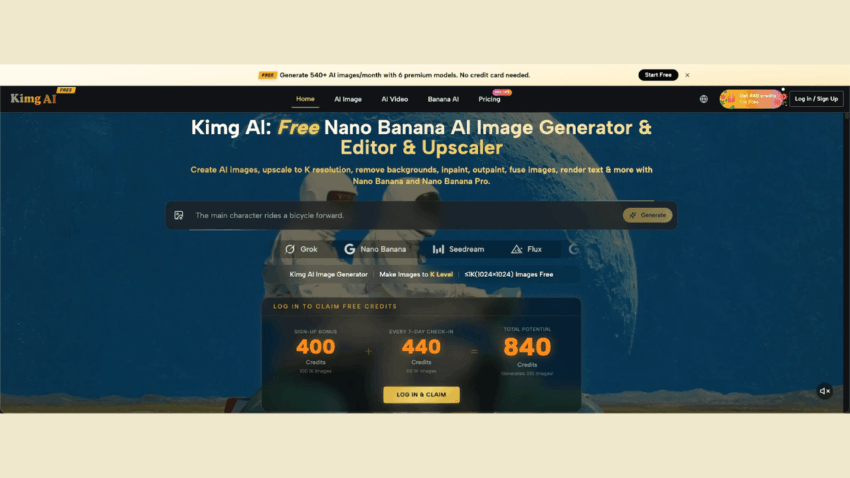
Kimg AI brings together some of the most capable AI image models available right now — including Nano Banana, Seedream, Flux, GPT Image 2, Grok Imagine, and more — all under one roof. For photo restoration work, this is a significant advantage.
- You can test how different models handle the same damaged photo and pick the best result.
- The interface is clean and straightforward — you don’t need to be a developer to use it.
- Beyond static images, Kimg AI also supports video generation. Once you’ve restored a photo, you can use Veo 3 to convert it into a short video clip — bringing a still portrait to life in a way that feels genuinely emotional.

V. Getting Started: Credits, Bonuses, and Free Generations
One of the more practical reasons to try Kimg AI is the free credit structure. It’s generous enough to do meaningful work before spending anything.
- Sign up and receive 400 credits immediately — no hoops to jump through.
- Check in daily for 7 consecutive days and earn an additional 440 credits, bringing your total to 840.
- That’s enough to generate 200+ images using premium models like Nano Banana AI, entirely for free.
- After the first week, the weekly check-in continues to reward you with 440 credits — giving you roughly 110 free image generations per week, ongoing.
For someone restoring a family photo collection, this is genuinely substantial. You could process an entire album without spending a cent.
VI. Tips for Getting the Best Restoration Results
AI models do the heavy lifting, but a few simple habits will noticeably improve your results.
- Scan at high resolution before uploading. More input data gives the model more to work with. 600 DPI is a good baseline for prints.
- Crop out irrelevant borders. White edges and tape residue can confuse the model. A clean crop focuses the AI on the actual image.
- Try more than one model. Nano Banana AI handles certain textures differently than Flux or Seedream. A quick comparison often reveals a clear winner for your specific photo type.
- Use the video feature selectively. Not every restored photo needs to become a video, but for milestone moments — a grandparent’s portrait, a childhood birthday — the Veo 3 conversion can turn a restoration into something truly moving.
Conclusion
Old photos hold stories that deserve to survive. The technology to restore them is no longer expensive or complicated — it’s accessible, free to start, and available right now. Kimg AI gives you a versatile set of tools, including Banana AI models, to handle everything from colorization to upscaling to video conversion, all with credits you earn just by showing up. Sometimes the best way to honor the past is to make it visible again.
