

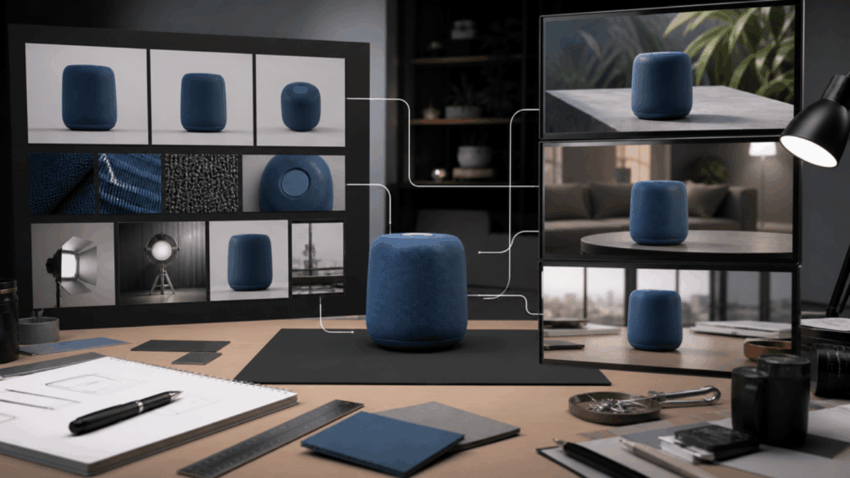
Product consistency is one of the fastest ways to separate a usable AI video from an attractive experiment. A bottle that changes height between shots, a shoe whose sole becomes a different color, or a logo that migrates across the packaging can make the entire piece feel unreliable—even when the lighting and camera movement look excellent.
The common response is to upload more images. That can help, but only when the references agree with each other and each one has a defined role. A large, disorganized reference folder often creates more ambiguity than a small, deliberate one.
Define What “Consistent” Actually Means
Consistency is not a single setting. For a product, it can include:
- silhouette and proportions;
- material and surface finish;
- color under different lighting;
- label, logo, and typography placement;
- moving parts and how they operate;
- scale relative to a hand or environment;
- approved imperfections, such as stitching or texture.
List the three or four traits a viewer would notice first. Those become hard constraints. Secondary details can remain flexible. If everything is described as equally important, the prompt gives no practical hierarchy.
For a pair of headphones, the headband curve, ear-cup shape, finish, and logo position may be essential. The exact reflection on the metal and the background color may change freely.
Create a Reference Set With Clear Coverage
A useful product package usually includes a hero view, a second angle, and a scale reference. Add a close-up only when a small feature must remain legible. Use images with compatible lighting and the same product version.
Avoid mixing old and new packaging, regional labels, prototype renders, and lifestyle photos from different campaigns. Humans can recognize that these images represent related versions. A generation model may combine them into a product that never existed.
Rename or number every reference before prompting. “Image 1” should always mean the approved hero shape; “Image 2” might define the rear ports; “Image 3” might establish how the product fits in a hand. This makes revisions much easier than referring to “the uploaded pictures.”
Separate Identity, Environment, and Movement
References usually perform one of three jobs:
- Identity references define what the product or character looks like.
- Environment references define the location, set design, color palette, or lighting.
- Movement references demonstrate camera motion, physical action, or pacing.
State that separation in the prompt. If a motion clip contains a different product, say that it should guide movement only and must not affect appearance. If a lifestyle photograph defines the environment, clarify that its people and objects should not be copied.
This role-based method is particularly useful in a multimodal Seedance AI workflow, where images, videos, audio, and text can influence the same generation. The system has more information, but the creator still needs to explain how that information should be interpreted.
Use One Product Anchor Across Every Shot
When planning multiple shots, repeat the product anchor instead of assuming it carries forward automatically. A concise anchor might read:
“The same matte-black over-ear headphones from Image 1 appear in every shot. Preserve the rounded rectangular ear cups, narrow silver hinge, centered white logo, and identical proportions. Do not add buttons, lights, text, or accessories.”
Place this statement before the shot plan and reinforce it when a difficult angle appears. Negative constraints are most useful when they name common errors: no duplicated handles, no extra labels, no changing colors, no deformed text.
Do not turn the anchor into a catalogue description. Focus on the visual identifiers required to recognize the approved product.
Stage Actions the Product Can Physically Perform
Consistency problems often begin with impossible blocking. If the product is asked to rotate, open, transform, splash through water, and land in a hand within a few seconds, every action creates another opportunity for geometry to change.
Start with plausible movement. Show a hand lifting the headphones by the headband, folding the correct hinge, and placing them on a desk. If the mechanism is important, use a close angle and enough time for the motion to read.
For complex interactions, a simple motion reference or rough 3D blocking can be more useful than several style images. The goal is not to make the reference visually beautiful. It is to remove uncertainty about spatial relationships.
Control Lighting Without Losing Color
Brand colors often drift because the scene lighting changes them. Describe the base product color and the lighting separately: “deep cobalt-blue plastic under warm late-afternoon light” is more precise than “a warm blue product shot.”
Keep the dominant light direction stable across connected shots. If the key light moves from left to right without motivation, the product may feel like a different render. Use environmental changes deliberately—such as moving from a bright store to a darker commute scene—while preserving material behavior and identifiable color.
Review With a Product Checklist
Watch the first generation once for overall flow, then review each product appearance at normal speed. Freeze frames only after identifying a moment that feels wrong. Compare the same four attributes in every shot: silhouette, color, feature placement, and scale.
Create a rejection rule before generating. For example, any altered logo, missing control, or changed product color fails the shot; a minor reflection difference does not. This prevents teams from approving a beautiful but inaccurate sequence because they have already spent time on it.
Keep a simple change log. If version two improves the hinge but damages the logo, note both outcomes. Prompt iteration works best when the team can trace which instruction or reference changed.
Build a Reusable Brand Kit
Once a reference package works, save the approved images, product anchor, negative constraints, pronunciation notes, and example motion references together. Add a short README explaining the role of each asset. Future campaigns can start from this kit instead of rebuilding product identity from scratch.
The kit should not freeze every creative choice. Environments, actors, seasons, and camera language can change while product identity remains stable. Browse relevant Seedance examples to study how different scenes describe motion and framing, then apply only the techniques that suit the product.
AI video consistency is less about finding a magic prompt than reducing contradiction. When teams define the non-negotiable product traits, give each reference one job, stage physically plausible actions, and review against an agreed checklist, the model has a much clearer target—and the final video has a better chance of surviving brand review.
